
Welcome to this comprehensive and informative series on SAP S/4HANA Integration with Ariba.This is S/4HANA Integration with Ariba Part 2 before diving into this topic please refer S/4HANA Integration with Ariba Part 1.
In this integration journey, I will teach you the complete end-to-end configuration required to integrate S/4HANA with all Ariba solutions for smooth and accurate data transformation.
This series is divided into multiple parts, so before reading any specific integration topic, it is my humble request that you go through the previous parts first for better understanding. Until and unless you understand the earlier parts, you may find it difficult to follow the upcoming integration topics.
Note – This integration is also valid for SAP ECC system
Table of Contents
Very Important Note
In this series, you will frequently hear the term CIG—Cloud Integration Gateway (now called Managed Gateway for Spend Management and SAP Business Network). For simplicity, we will continue to call it CIG. It is Ariba’s cloud integration tool and plays a key role in the entire process.
Although we say “SAP S/4HANA Integration with Ariba,” we are actually integrating S/4HANA with CIG, and CIG then routes the data to the correct Ariba solution (Buying, Sourcing, Contracts, etc.).
Since CIG is already connected to Ariba, our main work is to integrate S/4HANA with CIG. So don’t get confused when the term CIG appears—keeping this in mind will make every configuration step easier to understand.
SAP S/4HANA Integration with Ariba Integration – Prerequisites
As you know, in the first part of SAP S/4HANA Integration with Ariba, we discussed the integration prerequisites such as system backup and the add-on installation process. In this second part of the series, we will cover the next set of prerequisites required for the integration
IP Whitelisting
After add-ons installation our next step of is whitelisting of IPs. see in simple words every organization has the firewall to protect their data and this firewall never allow any third party software or services involvement until and unless IP Whitelisting is done.
Here, we are integrating S/4HANA with CIG, and our integration flow is as mentioned below:
1. S/4HANA ——> CIG (Outbound)
2. CIG ——>Cloud Connector ——->S/4HANA (Inbound)
so here we need to whitelist the IPs of both flow according to CIG data centers.
Whitelist IPs for S/4HANA —-> CIG
To send the transactions from S/4HANA to CIG you need to whitelist the below IP address in your firewall. Based on the CIG data center you are connecting to this will change.
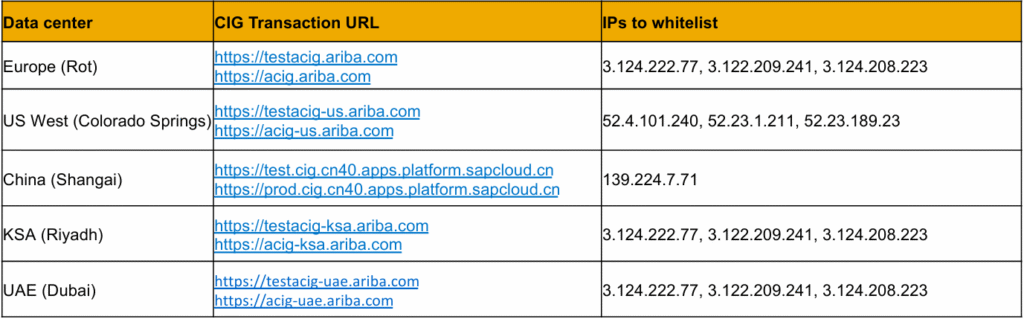
Whitelist IPs for CIG ——>Cloud Connector ——->S/4HANA
To receive the transactions from CIG successfully your cloud connector will need to establish a secure tunnel with the CIG Subaccounts. Based on the region host you are connecting to you need to whitelist the below IP ranges in your firewall.
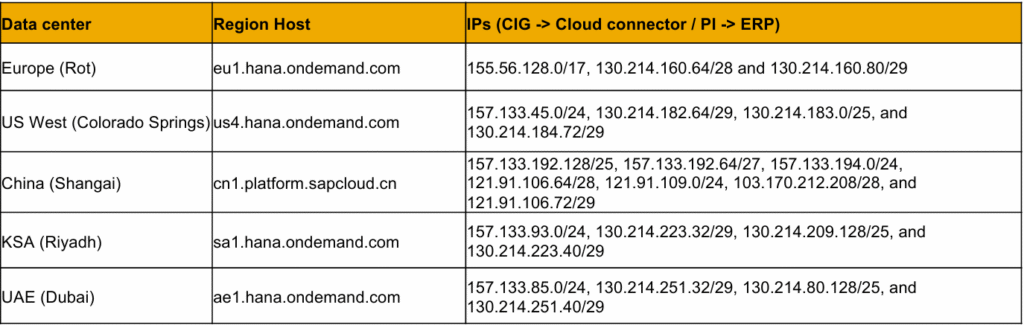
Installation of Cloud Connector
The next prerequisite step is the installation of the SAP Cloud Connector.
BUT
What is the Cloud Connector?
SAP Cloud Connector provides a secure communication channel between on-premise SAP systems and CIG. It ensures safe and controlled data exchange by allowing only authorized communication between CIG and the ERP system. SAP Cloud Connector acts as a reverse invoke proxy. Because of this reverse-invoke capability, there is no need to open inbound firewall ports in the on-premise network for cloud access to internal systems.
Please keep in mind that our integration flow is as mentioned below:
1. S/4HANA ——> CIG (Outbound)
2. CIG ——>Cloud Connector ——->S/4HANA (Inbound)
The Cloud Connector is used for the inbound integration flow. It lies between CIG and S/4HANA, enabling secure communication from the cloud to the on-premise system.
As a CIG consultant, you do not need to worry about installing the Cloud Connector, as this is typically handled by the Basis team. However, I am still mentioning the Cloud Connector installation guidelines here for your reference and better understanding. https://help.sap.com/docs/connectivity/sap-btp-connectivity-cf/cloud-connector?locale=en-US
Till this point, we are covering the SAP Ariba Integration prerequisites, and the next few parts will complete these prerequisites. After that, we will move on to the actual integration configuration. Once again, it is my humble request that you go through all the previous parts of the integration series, as it is mandatory. Only then will you be able to understand the integration configuration more clearly, quickly, and without confusion.