
Welcome to this comprehensive and informative series on SAP S/4HANA Integration with Ariba.This is S/4HANA Integration with Ariba Part 5 before diving into this topic please refer S/4HANA Integration with Ariba Part 4.
In this integration journey, I will teach you the complete end-to-end configuration required to integrate S/4HANA with all solutions of Ariba for smooth and accurate data transformation.
This series is divided into multiple parts, so before reading any specific integration topic, please ensure you have gone through the previous parts for better understanding.
Note – This integration is also valid for SAP ECC system.
Table of Contents
SAP S/4HANA Integration with Ariba, Integration – Prerequisites
So far in this integration series, we have been discussing the integration prerequisites. This blog is the final part of the prerequisite phase. By the end of this blog, all integration prerequisites will be completed, and from the next part onward, we will begin the actual integration configuration.
In this blog, I have explained the remaining prerequisites, which include Ariba Directory setup, Business Function activation,SSL parameter configuration,Business End Points Configuration and (Roles & Accesses)
Although these activities are handled by the Basis team, as a CIG consultant, it is important to understand the purpose and usage of these prerequisite configurations.
Creation of Ariba Directory
As part of the prerequisite activities, you need to create a directory with a minimum required space of 1 GB, and full read/write permissions must be assigned to it.
Provide an appropriate name for the directory, such as “Ariba Directory.”
Once the Basis team creates the directory, you can verify it in the S/4HANA system by executing transaction code AL11.
Purpose of This Directory
When you send master data to Ariba, you need to run the program ARBCIG_MASTER_DATA_EXPORT.
After execution, the master data is converted into a ZIP file and temporarily stored in this directory. The file is then sent to Ariba.
This is why creating and maintaining this directory is mandatory.
Business Function Activation
To send Service Purchase Orders with multiple service child line items, the following Business Functions must be activated:
LOG_MM_P2PSE3
LOG_MM_P2PSE2
LOG_MM_P2PSE1
LOG_MM_CI_2
LOG_ESOA_OPS_2
ESOA_OPS01
This activity is handled by the Basis team, and some ABAP components may also be involved, so you do not need to worry about the technical details.
These business functions can be activated and you can verify using transaction code SFW5.
SSL Parameters
For successful RFC connectivity, the following SSL parameters must be maintained. These parameters can be checked and maintained in the S/4HANA system using transaction code RZ11.
ssl/client_ciphersuites :
150:PFS:HIGH::EC_P256:EC_HIGH
ssl/ciphersuites :
135:PFS:HIGH::EC_P256:EC_HIGH
icm/HTTPS/client_sni_enabled : TRUE
ssl/client_sni_enabled : TRUE
Again this activity is handled by the Basis team so you do not need to worry about the installation process.
Business Network End Points Configuration
Why we do Business Network Endpoint Configuration?
We do Business Endpoint Configuration so that SAP Business Network knows exactly where and how to send business documents (PO, Invoice, Service Entry, Order Confirmation) to the target system (Buyer ERP, Supplier ERP, CPI, or CIG).
It defines the receiver system, endpoint URL, protocol, and authentication for each document type.
What happens if we do NOT do it
If Business Endpoint Configuration is not done:
- Business Network cannot route documents
- Documents get stuck in the network
- Errors like “No valid endpoint found” occur
- POs, invoices, SES, confirmations will not reach SAP or supplier systems
- Integration fails even if CIG, CPI, and certificates are correct
How we do Business Network Endpoint Configuration in SAP Business Network
- Login to buyer.ariba.com the SAP business network buyer portal will open.
- Choose account profile

- Go to Setting
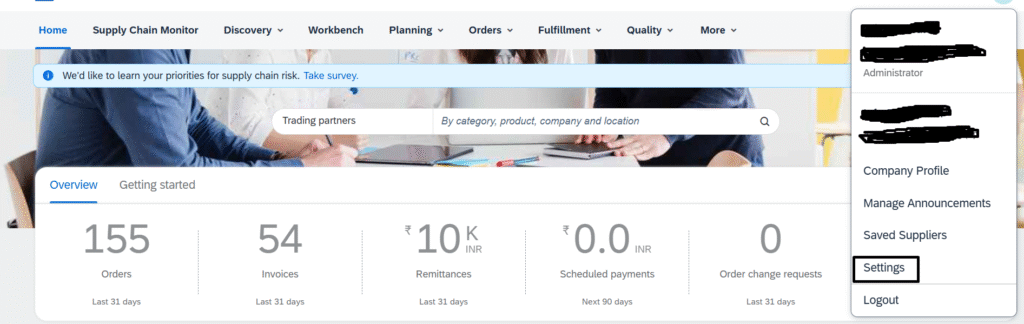
- Integration——–> Business Application IDs and End Points (cXML and OData Setup)
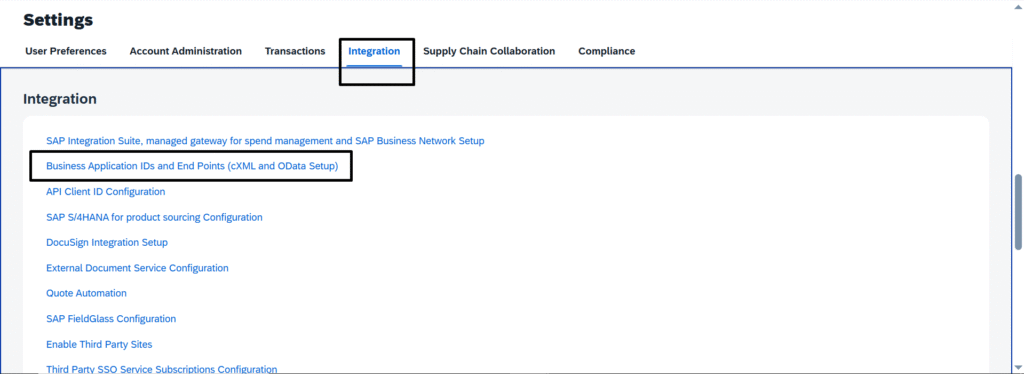
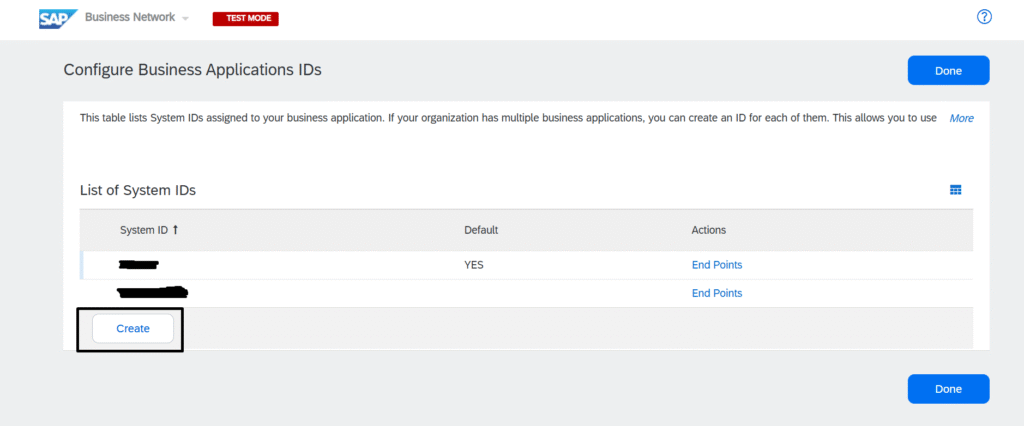
- Now here you need to add S/4HANA System ID.
- Click on Create
- Mention the ERP system ID and other details
- Save
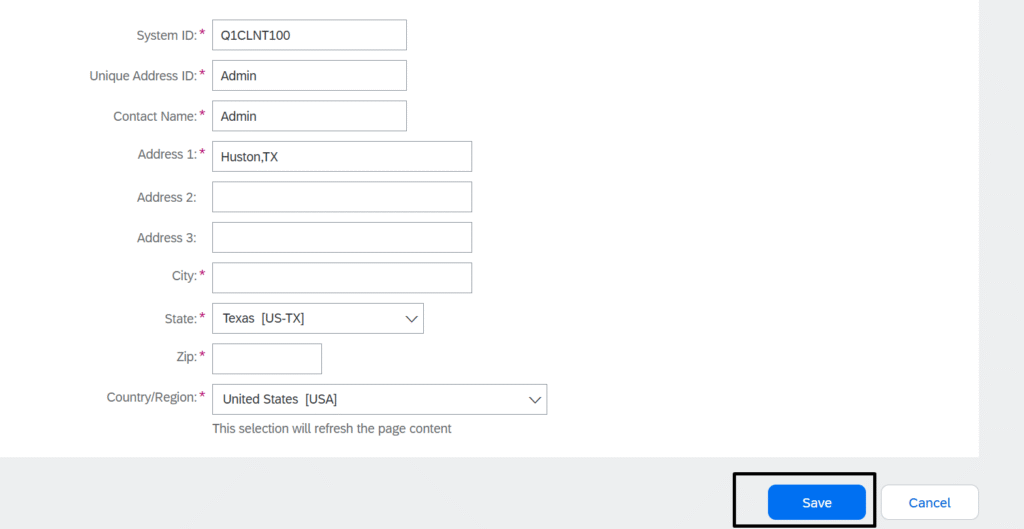
- Congratulations,You have Successfully configured Business Network Endpoints.
Above, I have explained the Business Endpoints configuration in detail with step-by-step instructions. If you still want additional information on this topic, you can refer to the this SAP Blog.
Roles and Accesses
Now that we have completed all the integration prerequisites, before starting the actual configuration, please ensure that you have the following roles and access
- Customer Administrator access for both Upstream and Downstream realms of Ariba
- SAP S/4HANA access with SAP_ALL authorization
- Development, Quality, and Production landscapes ready
- SAP S/4HANA Communication User created for Ariba integration
- SAP for Me access